JamfEmigre is a Jamf tool to migrate a single policy from one JSS to another. It allows you to edit the policy in order to resolve possible
Manifesto
My second app Manifesto is ready for testing.
Manifesto is an all purpose tool for doing tasks in Jamf.
See the Apps page for details.
The Mac beta is available for testing here:
https://testflight.apple.com/join/Va9Zewcc
An introductory film is available here
Staging Area
My inaugural app Staging Area is ready for testing.
Staging Area is a simple editor for Jamf Pre-Stages.
If interested in testing the Mac beta is available for here:
https://testflight.apple.com/join/bZqrYFzo
Note: the beta may still have features that are not working and are not recommended for use in a live environment!
Further information is available here:
https://docs.google.com/document/d/1Z57o2sXKCYrzrfEccQqGwbu6PkQ8XH5oNV0nkc-cMV0/edit
About Staging Area
Under Automated Device Enrollment (or DEP as many of us still prefer to call it) the Jamf pre-stage into which a device is added is the key element that determines how the machine will be built.
This initial setting defines the build path for the device and can be set that can have many different outcomes. This is particularly true in a large organisation with many different types of users requiring different software and basic configuration.
For example a school with:
- Students
- Teachers
- Admin staff
- IT staff
- Open Access devices
- Loan devices
The prestage that a device is assigned to can therefore determine if a machine is going to be built as a:
- A student laptop
- A academic staff laptop
- An admin users machine
- A Creative open access machine
- A Stripped down research machine with minimal management
- Or any other variation that you might choose.
In this sense, managing the prestage your devices belong to is really important and something that you want to be able to keep track of, easily. Inspite of this, in Jamf it is actually not an easy task.
To view what prestage a device is assigned to requires the following steps
Select Automated Device Enrollment in Global Management

Select Devices within Automated Device Enrollment

Select Apple School Manager or Apple Business Manager within Automated Device Enrollment

Select an actual device and view/edit its current pre-stage assignment status
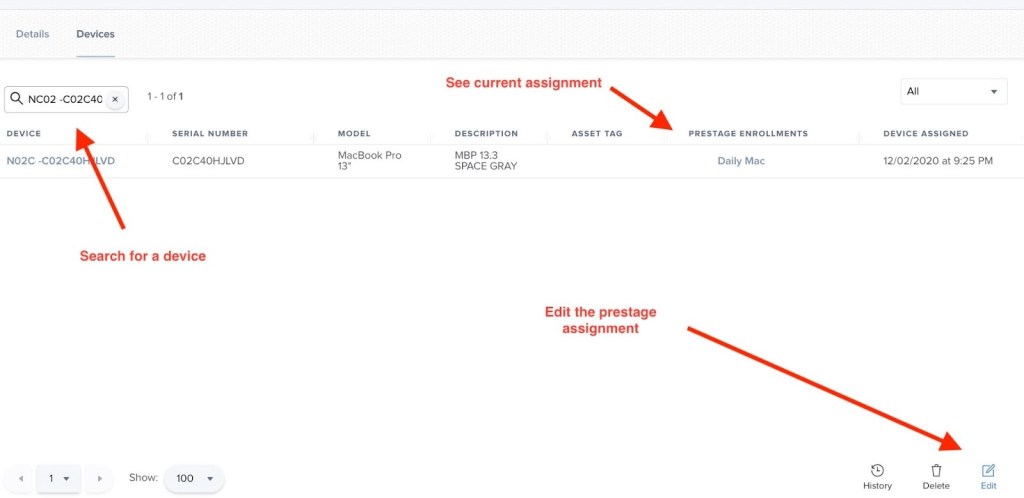
Ideally, once a device is added to a pre-stage that is where it will stay, but in reality devices often move between pre-stages.
- Perhaps from a test to a live pre-stage
- Or a device has been assigned to the wrong prestage and needs to be rebuilt.
- Sometimes, a device is within Jamf, but not in a prestage at all.
As we can see, managing this is something which is currently quite clunky within the JSS and requires a lot of navigation.
StagingArea is a simple tool which will make this easier. Currently, it will do the following:
- List all prestages available in Jamf
Each prestage can be clicked on to get full details
- List all devices in a jamf instance enrolled in a pre-stage
Each device can then be moved to a different prestage
- Select a prestage by id, list all devices in that pre-stage and be able to add/remove a device to it.
- Select a device by ID and then change its assigned prestage
- Enter a device not currently assigned to a prestage and add it to one
- Remove a device from a prestage
 ethaMoos